Android beta · Mobile 0.1.30 · APK download. Models and external API usage are separate.
ONE APP. TWO WAYS TO MAKE IT YOURS.
✳
FORGE LOCAL
Your phone. Your own AI.
Run compatible downloaded models on your phone, or connect an API provider you choose. No Windows PC is required for Local.
Find models on Hugging Face or import compatible GGUF / LiteRT-LM files.
Type, speak and choose an expressive portrait and available voice.
Explore Canvas and supported mobile workspaces.
Keep local records and manage conversation history in Settings.
Model compatibility and speed depend on phone memory, hardware and format. Online research and APIs need internet access. A website cannot automatically use your phone’s model.
⌘
FORGE DESKTOP · COMPANION MODE
Your PC’s power. In your hands.
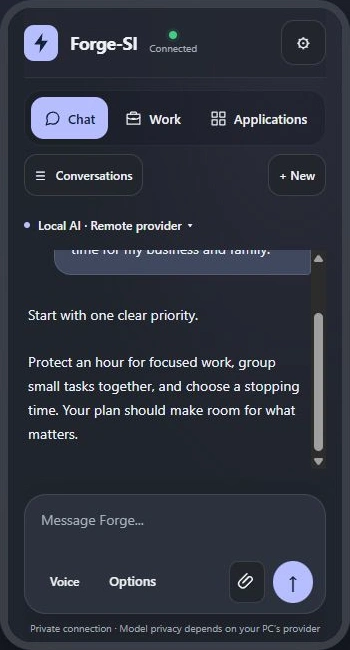
Connect to Forge for Windows to use the models, supported applications and saved records on your paired PC.
Continue Chat and Work, with supported files and outputs.
Chat inside an application and keep its workspace in view.
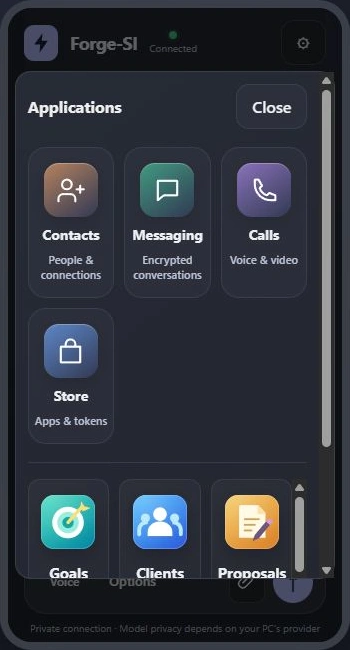
Use supported installed apps, subject to the PC’s access and permissions.
Open voice controls without leaving the application.
Requires an awake, reachable, paired Forge Windows PC and a compatible host version. Phone pairing and Forge account sign-in are separate.
KEEP THE CONVERSATION. KEEP THE WORKSPACE.
Small screen. Room for your ideas.
Say it your way.
Type or open voice.
Bring your tools along.
Supported applications on your paired PC.
Companion interface previews with sample content. Local has its own interface and mobile capabilities; it is not a copy of every Windows app.
YOUR ACCOUNT, CLOSE AT HAND
Your phone can open the door.
Forge Authenticator keeps offline six-digit codes on your phone. Register that installation with your Forge account to approve supported PC and website sign-ins using your phone’s fingerprint or PIN.
Scan the sign-in QR, check the matching number and approve. Your public Forge identity QR is a different code—it does not grant account access.
The separate Forge Link APK is the companion-only option. Version 0.76.0 adds Authenticator and registered-phone sign-in approval in its Settings, independently of PC pairing. Prefer Forge Mobile if you also want Local mode.
Mobile and Link are separate Android apps. Their local chats, pairing settings and authenticator registration do not automatically transfer between installations. Update the same app over an existing compatible installation to retain its data.