
Plan & deliver
Goals & Tasks
Turn a big ambition into small, doable steps.
Try asking
“Help me turn this goal into a plan for the week.”
APPLICATIONS · MADE FOR YOUR EVERYDAY
Your clients, plans, campaigns and creative ideas deserve more than scattered tabs. Give each one a focused workspace—with AI you can talk to.
THE BIG IDEA
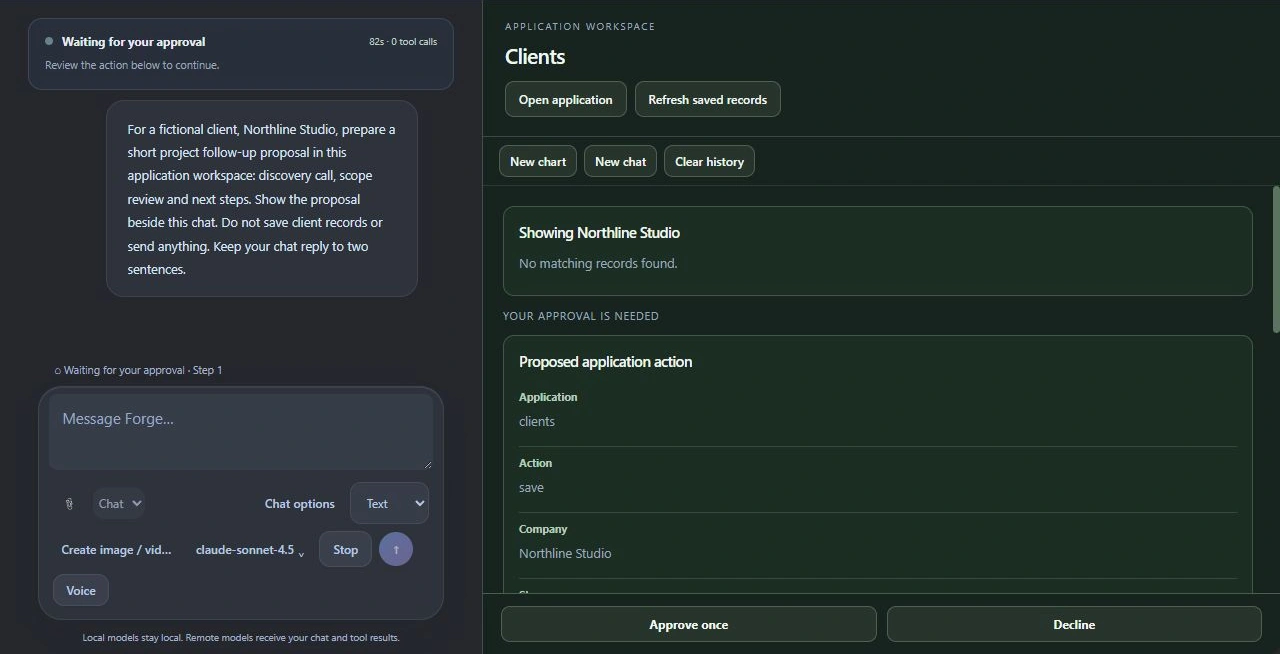
Start a chat from a supported application. Its saved records give the conversation context, so you can ask questions, work through ideas and use the tools that belong to that app.
You “Help me improve this proposal.”
Forge A conversation with the proposal in context, ready for you to review and refine.
Supported actions vary by application and selected model. Review changes and approve external actions when requested.
VOICE + APPLICATION WORKSPACE
Open the application workspace beside your voice portrait. Discuss its saved records, review proposals and see the worksheet while you talk.
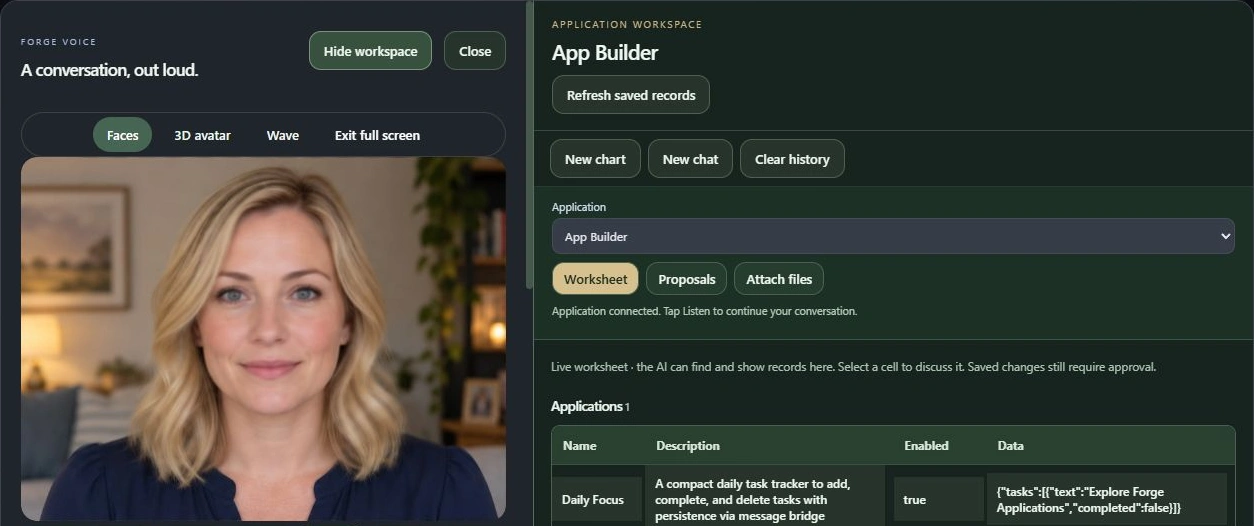
Captured from Forge with example content. Cropped still interface view; microphone and speech playback were not active for this screenshot.
FIND YOUR NEXT FAVOURITE TOOL
15 applications to explore
Plan & deliver
Turn a big ambition into small, doable steps.
“Help me turn this goal into a plan for the week.”

Plan & deliver
Keep milestones, deadlines and next steps together.
“What is holding up this project?”

Plan & deliver
Give your meeting notes a useful next chapter.
“Turn these notes into decisions and follow-up tasks.”

Plan & deliver
Bring priorities and business notes into focus.
“Help me decide what deserves attention today.”

Clients & growth
Keep relationships moving, one thoughtful follow-up at a time.
“Which client should I follow up with next?”

Clients & growth
Shape a clear scope, proposal and estimate.
“Draft a proposal around this client’s requirements.”

Clients & growth
Welcome new clients with a plan that feels prepared.
“Build a welcome checklist for this project.”

Clients & growth
Organize imported enquiries and review suggested replies.
“Help me draft a useful reply to this enquiry.”

Create & share
Find a brand’s voice and plan content worth sharing.
“Give me campaign ideas for this product launch.”

Create & share
Make room for newsletters, descriptions and fresh ideas.
“Turn this product brief into a newsletter draft.”

Create & share
Combine text, shapes and images on your own canvas.
“Help me develop a poster for this campaign.”

Organize & understand
Work through approved business documents with source references.
“Find the information behind this question.”

Organize & understand
Keep stock, suppliers and reorder needs in view.
“Which items might need reordering?”

Organize & understand
Turn imported data into a story you can use.
“Summarize this spreadsheet and suggest a chart.”

Build your own
Describe a tool, refine the brief and build a personal application.
“Let’s build an application for my workflow.”
Contacts, Messaging, Calls and Store have permanent places in your Applications launcher.
Save people, businesses and Forge numbers. Start a conversation from a contact.
Use Forge numbers for encrypted messages and direct voice or video calls. Both participants must be online.
Discover available applications, see their token prices and manage what you install.
CHOOSE WHAT YOU NEED
Business Applications requires Business Pro in Standard, or Complete in Pro. Individual Store applications may also require tokens; their listings show the current cost.
Signed-in beta accounts start with 1,000 Forge tokens. Token packs use Microsoft checkout. Your selected local model or compatible provider powers AI assistance.
Compare Standard & Pro →Latest Windows update in Microsoft certification. Interface examples use sample content.
THE COLLECTION IS GROWING
Canvas and Office are available as separate Windows products, alongside the growing Forge application collection. Explore the product pages for previews and direct downloads.
An open workspace for conversation, research and visual results. Ask for something useful and keep the result beside your chat.
Get Canvas · Microsoft Store ↗Also in Forge Mobile Local. Models and access requirements apply.
A focused place for your notes, with account-linked encrypted note synchronization when configured.
Look for availability and setup in the Forge Store. Saved data from unrelated apps does not automatically sync.
Browse with an AI conversation beside the page. Ask it to find, open and work with supported web controls.
Windows capability. Websites may require manual sign-in or limit automation.
StaticLabs Office Intelligence is a developed, separate Windows app with AI chat and voice. Create documents, themed presentations and spreadsheets.